Which language would you like to use?



If you find difficulties in connecting to the internet while abroad, please make sure you follow all of these points and instructions.
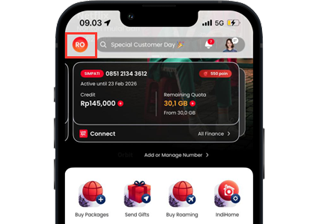
01
Access MyTelkomsel
Open MyTelkomsel App and click the profile icon on the top left of the Home page.
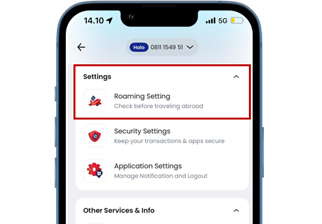
02
Roaming Setting
Scroll and select the “Roaming Settings” menu..
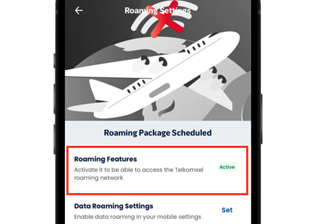
03
Check status
Make sure the Roaming Feature is active.


01
Check credit balance
Check your remaining credit balance here.

02
Check Roaming Quota
You can also check your remaining Roaming Quota here.

03
Buy Package
Tap the Buy Package menu to activate the package you want.

04
Check Poin
Your remaining Telkomsel Poin will be displayed here.

05
Monitoring roaming details
Tap the little white arrow “>” to monitor your roaming status & usage.

06
Roaming Status
Check your roaming status and your current country location.

07
Network Information
You can see the provider’s name you’re currently using.

08
Network Quality
Check the network quality of the provider you’re currently using.
Why does my phone have no signal?

I have tried all of the points instructed on this page, but still could not connect to the internet, why?
Asia
Africa
Europe
America
Oceania
About VoLTE
2G and 3G termination
5G Countries