Which language would you like to use?



Discover a range of protection products on MyTelkomsel App and DigiPOS outlets to live worry-free with Phone Screen Protection, Gadget & Theft Protection, Cyber Protection, and Travel Protection.
Telkomsel Protection products are designed to give you peace of mind by safeguarding you from various everyday risks. Whether you're using your device, transacting online, or traveling, you can stay confident knowing you’re covered.
This protection helps you manage unexpected situations such as accidental device damage, loss or theft of your gadget, financial losses from digital fraud, and even travel disruptions like delays or unforeseen incidents. With a seamless and flexible purchase experience, you can choose how to get protected.
How to purchase:
Choose from a wide range of protection options, including Phone Screen Protection, Gadget & Theft Protection, Cyber Protection, and Travel Protection, all tailored to support your lifestyle.
Enjoy comprehensive coverage and live with greater confidence, because with Telkomsel Protection, you are always one step ahead of life’s uncertainties.


Protect your smartphone screen from unexpected physical damage such as drops, slips, impacts, or pressure that may cause cracks or breakage.
Choose the protection plan that fits your needs with Phone Screen Protection by MoneeInsure:
Premium pricing may vary depending on the purchase channel. Purchases made through outlets or channels outside the MyTelkomsel App may be subject to price adjustments based on applicable policies.
Protect your device against unexpected risks, including accidental damage and loss due to incidents such as drops, impacts, liquid damage, fire, explosions, lightning, and natural disasters.
Choose the protection plan that suits your needs with Gadget & Theft Protection by Great Eastern General Insurance:
Premium pricing may vary depending on the purchase channel. Purchases made through outlets or channels outside the MyTelkomsel App may be subject to price adjustments based on applicable policies.
Stay protected from financial losses caused by cyber incidents, including identity theft and unauthorized access to your personal accounts during the active policy period.
Coverage includes:
Choose the protection plan that suits your needs with Cyber Protection by Malacca Trust Insurance:
Premium pricing may vary depending on the purchase channel. Purchases made through outlets or channels outside the MyTelkomsel App may be subject to price adjustments based on applicable policies.
Enjoy peace of mind during your journey with protection against unexpected travel risks such as accidents, flight cancellations or delays, and baggage loss or delay.
Travel Protection by Malacca Trust Insurance includes:
Premium pricing may vary depending on the purchase channel. Purchases made through outlets or channels outside the MyTelkomsel App may be subject to price adjustments based on applicable policies.
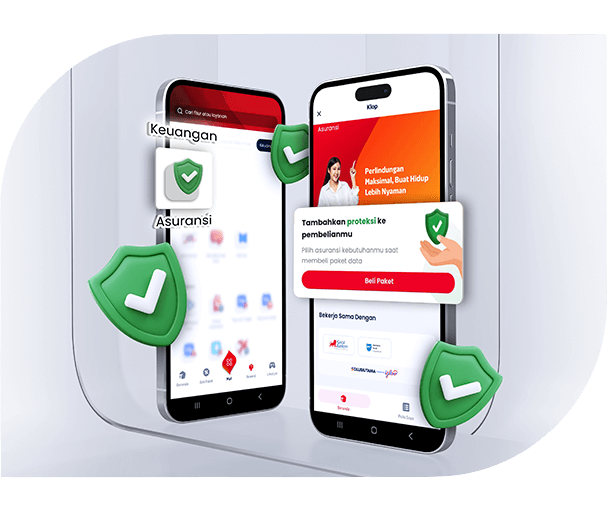
On the “Finance” section, tap “Insurance” menu.
If you don’t have any protection, you’ll be directed to “Buy Package” page.
Choose the package you want on the “Buy Package” page.
On the “Package Detail” page, the protection product will be automatically checked.
Choose a payment method you want to use.
Tap “View Policy” or the notification to see the detail of your active protection.
01
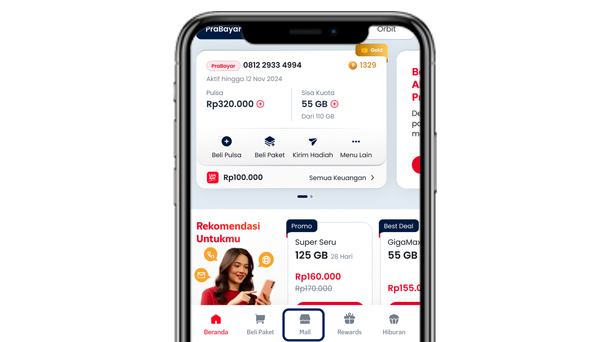
Open Mall
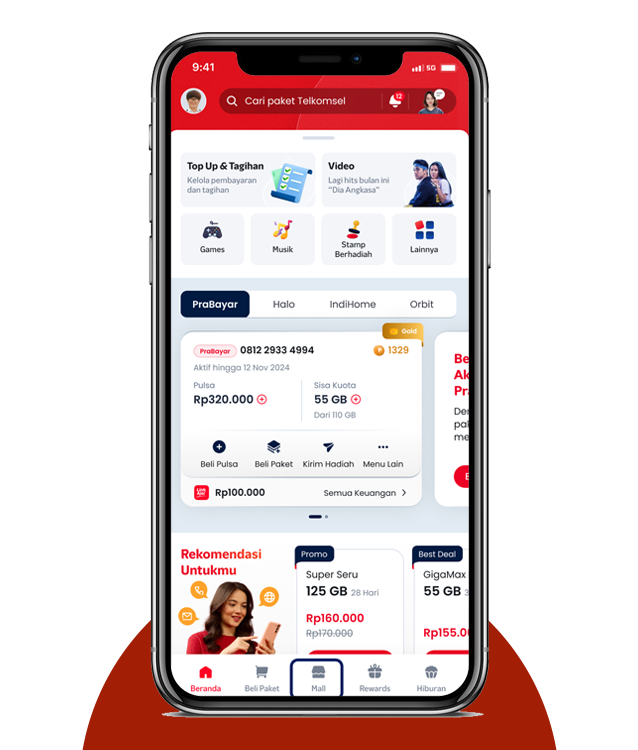
On the main dashboard, tap “Mall” menu.
02
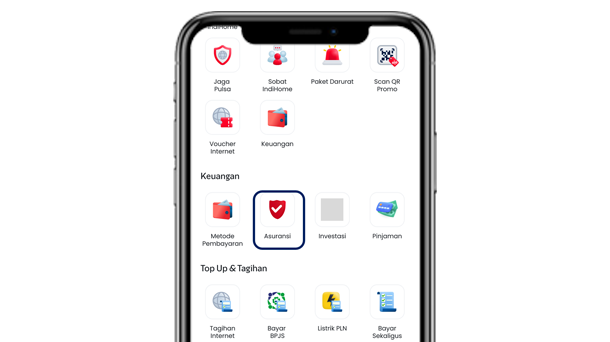
Find “Insurance”
On the “Finance” section, tap “Insurance” menu.
03
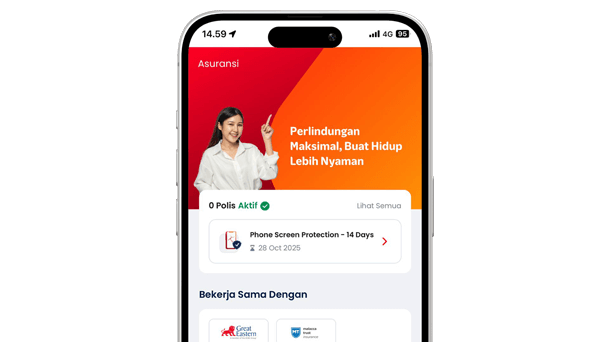
Insurance Hub
Check the active protection by tapping the policy detail or “My Policy”.
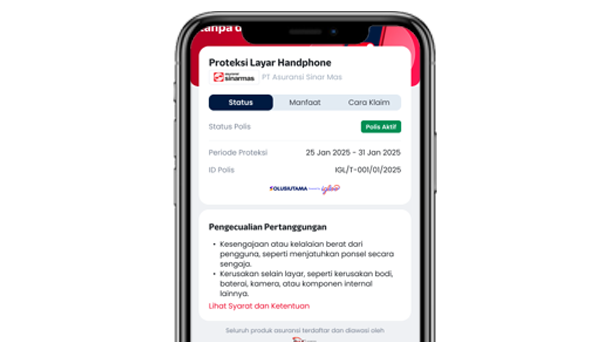
04
Protection details
Check your protection benefits and policy details (policy number & validity period).
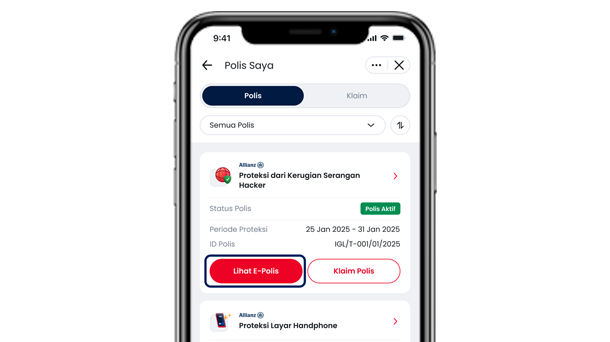
05
Check policy list
View your protection list by tapping “My Policy”.
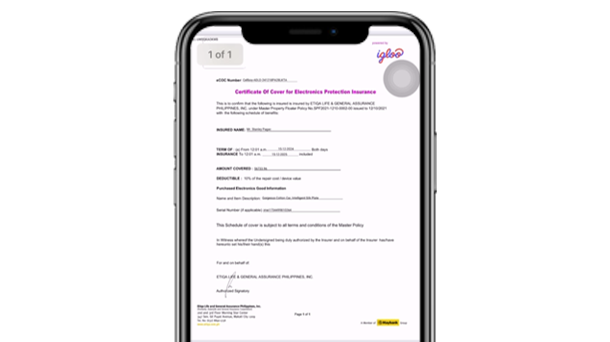
06
E-Policy
You can view your “E-Policy” directly on MyTelkomsel App.
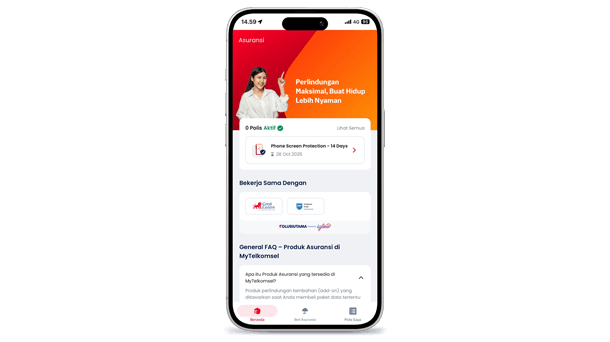
01
Access Insurance Hub
Check the active protection by tapping the policy detail or “My Policy”.
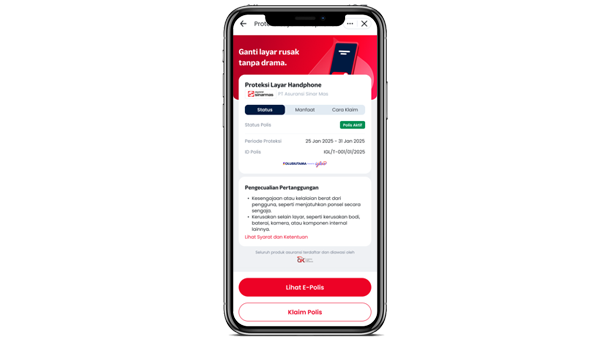
02
Your protection details
Check your protection benefits and policy details (policy number & validity period).
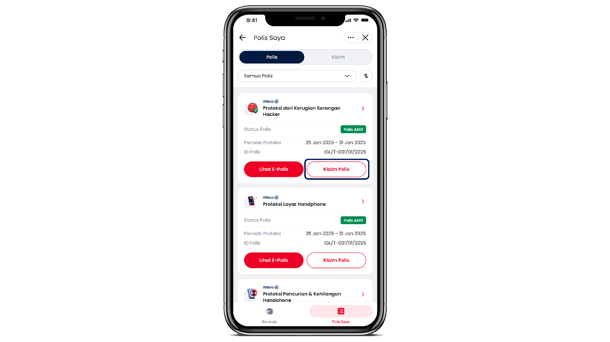
03
Claim your policy
Choose “Claim Policy” menu to start claiming.
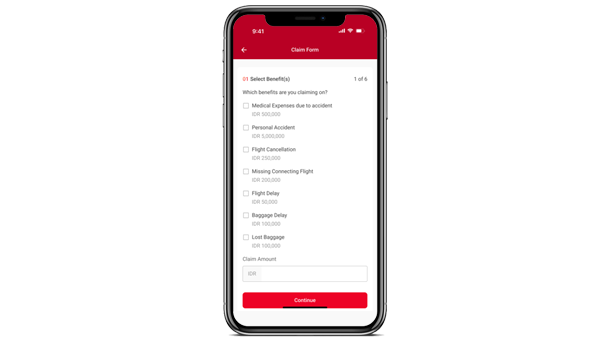
04
Fill the form
Complete all required data on the claim form and submit the claim.
What are Telkomsel Protection Products?

What types of protection are available?
Who provides these protection services?
How are these protection products offered?
Will all customers receive the same offers and pricing?
Can I have more than one protection product?
Are protection products automatically renewed?
Where can I view my insurance policy?
Why does my policy not appear in “My Insurance” or “Insurance Hub”?
How do I purchase protection?
When do I choose protection?
Do I need to activate or fill in additional data?
Is the protection active immediately after purchase?
How do I check if my protection is active and view my policy?
Is the protection price the same in MyTelkomsel and at outlets?
Can I purchase protection without a data package?
Can outlets assist with claims?
Do I still need the MyTelkomsel App if I purchase via an outlet?
Can I cancel the protection after purchase?
How do I submit an insurance claim on MyTelkomsel App?
Does the account submitting the claim need to be the same as the purchaser?
What documents are required for a claim?
What happens if my claim documents are incomplete?
How long does the claim process take?
How will I know if my claim is approved or rejected?
What is Phone Screen Protection?
How long is the coverage period of Phone Screen Protection?
Can I buy the same protection more than once?
What is the compensation/coverage limit of the Phone Screen Protection?
What is Gadget & Theft Protection?
How long is the coverage period of Gadget & Theft Protection?
What is the compensation/coverage limit of Gadget & Theft Protection?
What risks are covered by Gadget & Theft Protection?
What is Cyber Protection?
How long is the coverage period of Cyber Protection?
What is the compensation/coverage limit of Cyber Protection?
What is Travel Protection?
How long is the coverage period of Travel Protection?
What is the compensation/coverage limits of Travel Protection?
How does Travel Protection cover my trip?
Who can purchase Travel Protection?
What countries are covered in the Travel Protection?
Can I cancel all of these protection products?
What if I need help with a claim or have other questions?
General Terms and Conditions of Telkomsel Insurance Products
Insurance Products Specific Terms and Conditions
Mobile Screen Protection by SeaInsure Terms and Conditions
Theft and Gadget Protection by Great Eastern Terms and Conditions
Cyber Protection by Malacca Terms and Conditions
Travel Protection by Malacca Terms and Conditions