


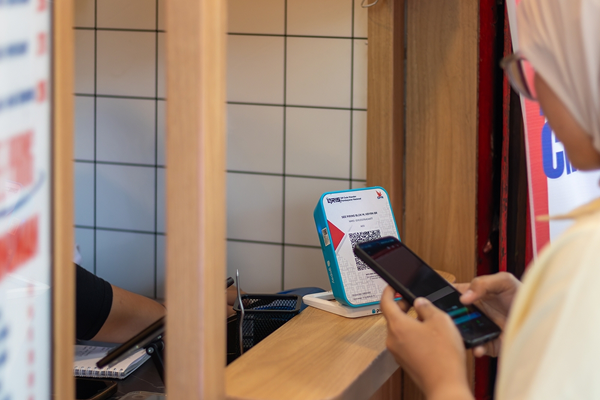


Knowing how to create QRIS All Payment has become increasingly important for businesses as digital payment options continue to grow. With customers using various e-wallets and mobile banking apps for everyday transactions, displaying a separate QR code for each payment platform can quickly become inconvenient. QRIS All Payment offers a simpler solution, allowing businesses to accept payments from multiple services using just one QR code.
So, what makes QRIS All Payment different from a regular QR code? And why is this payment solution becoming more important for businesses today? Let’s take a closer look at how it works and the benefits it can bring to your business.
What Is QRIS All Payment?
QRIS, or Quick Response Code Indonesian Standard, is a QR-based payment standard developed by Bank Indonesia together with the Indonesian Payment System Association or Asosiasi Sistem Pembayaran Indonesia (ASPI). Its main purpose is to bring different QR payment systems together under one standard.
With QRIS All Payment, you can use one QR code to receive payments from various banking apps and digital wallets that support QRIS. This means you do not need to prepare a separate QR code for every payment application your customers use.
For example, imagine you running a small food stall. One customer wants to pay with GoPay, another uses DANA, while someone else prefers mobile banking. Instead of displaying several QR codes at your cashier, you can simply provide one QRIS code that supports these payment options.
Why Is QRIS Important for Businesses?
Bank Indonesia data shows that the number of QRIS merchants has reached tens of millions, with SMEs making up a large share of users. This reflects how digital payments have become an increasingly important part of everyday business transactions.
So, what makes QRIS useful for businesses?
1. Makes Payments Easier for Customers
QRIS allows customers to pay using different supported payment applications. They do not have to look for a specific QR code based on the app they use. Customers simply scan the QR code, enter the payment amount when required, and complete the transaction through their preferred QRIS-supported application.
2. Reduces Dependence on Cash
As more customers choose digital payments, businesses may not need to keep as much physical cash available for transactions. Digital payments can also help reduce the risk of accepting counterfeit cash or accidentally giving customers the wrong change.
3. Makes Transaction Records Easier to Manage
QRIS transactions are recorded digitally, making them easier to monitor and review. For business owners, these records can be useful when checking daily revenue or reviewing incoming payments.
Having digital transaction records can also make financial management more organized, especially as the number of transactions grows.
How to Create QRIS All Payment for MSME
Learning how to create QRIS All Payment is easier than you might think. Generally, you need to register through a licensed Payment Service Provider or Penyedia Jasa Pembayaran (PJP) and follow the requirements set by Bank Indonesia. Here are the steps you can follow:
1. Choose an Official QRIS PJP
Make sure the QRIS provider you choose is a Payment Service Provider (PJP) licensed by Bank Indonesia. You should also consider a service that matches your business needs and scale.
2. Complete the Registration
Registration can usually be completed through the provider’s official website, app, or other authorized channels. You will typically need to provide information such as your name, business details, bank account number, phone number, and email address.
3. Prepare and Upload the Documents
You will need to provide several documents when applying for QRIS. These commonly include your KTP, bank account information, and business details. Depending on the provider, you may also be asked to submit a photo of your business location or other supporting documents.
4. Wait for the Verification Process
Once you submit your information and documents, the provider will review your application. Make sure all details are accurate and that your uploaded documents are clear and easy to read to avoid delays during the verification process.
5. Activate and Start Using Your QRIS
Once your application is approved, you will receive your QRIS, which you can display at your cashier or share digitally. When customers want to pay, they can simply scan your QRIS using a mobile banking app or e-wallet that supports QRIS.
What Are the Benefits of Using QRIS All Payment?
There’s a reason why QRIS has been adopted so quickly. Besides making payment transactions more convenient, QRIS All Payment offers several practical benefits for businesses.
1. One QR Code for Multiple Payments
You don’t need to fill your cashier counter with multiple QR codes. With just one QR code, you can accept payments from various supported payment applications.
2. More Convenient Transactions
Customers only need to scan the QR code to make a payment. They also don’t have to ask whether their preferred payment method is available, making the payment process simpler and more convenient.
3. Less Reliance on Cash
You don’t need to prepare small bills as often for customers who need change. Using digital payments can also help minimize the risk of receiving counterfeit money.
4. More Organized Transaction Records
Every digital transaction is recorded in the system, making it easier for you to monitor and recap your payments. This can help keep your business transaction records more organized.
5. Potential to Increase Sales
The more convenient payment options you provide, the fewer barriers customers may face when making a purchase. For a business, a simple and convenient payment experience like this can help create a more positive customer experience.
Challenges of Verifying QRIS Payments
Having QRIS certainly makes transactions more convenient. But how can you make sure that a customer’s payment has actually gone through?
When there are only a few transactions, you may simply check the notification on your smartphone. The challenge becomes more noticeable when the store gets busy. Employees have to serve customers while checking the payment app at the same time. Without careful attention, a payment can be missed, or a transaction can be matched incorrectly.
This is where a transaction notification system can help. Soundbox from Telkomsel Enterprise helps businesses monitor QRIS transactions through real-time voice notifications. Each successful transaction can be confirmed directly through the Soundbox, so you don’t have to keep checking the payment app manually.
This solution can help improve operational efficiency, reduce the risk of payment verification errors, and provide a faster and more reliable transaction experience. To learn more about how Soundbox can simplify payment transactions at your store, consult Telkomsel Enterprise today.
FAQ
Can QRIS receive payments from all banks?
QRIS can receive payments from various banks and digital wallets that support QRIS. This means customers don’t need to use the same bank or payment application as the merchant. They simply need to scan the QRIS code using a supported payment app, and the payment can be processed.
Does creating QRIS all payment come with a fee?
The fees for creating and using QRIS may vary depending on the PJP or service provider you choose. For this reason, it’s a good idea to check the applicable fees and terms with the PJP before registering. Besides service fees, merchants may also be charged a Merchant Discount Rate (MDR) based on the applicable regulations.
What are the requirements for creating QRIS?
Generally, you need to prepare KTP, a bank account number for receiving funds, phone number, email address, and business information such as your business name and address. Some PJPs may also ask for a photo of your business location or other supporting documents. Keep in mind that the requirements may vary between providers.
How long does it take to use QRIS after registering?
QRIS can only be used after the PJP has completed the verification process and approved your application. The processing time may vary depending on the service provider and the completeness of the information you submit. To avoid issues during verification, make sure all your information and uploaded documents are accurate, complete, and clearly visible.