

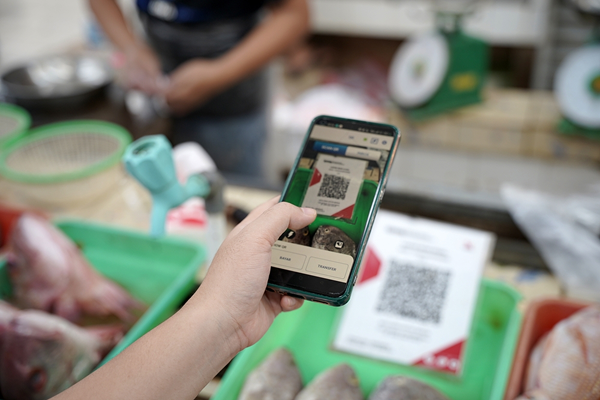


Knowing how to pay using QRIS makes everyday transactions easier. Customers can complete various daily purchases digitally by simply scanning a single QR code. Although the process is simple and convenient, customers still need to take a few precautions to ensure their payments are secure and successfully received by merchants.
So, how can you pay using QRIS correctly, and what should you check after completing a transaction?
What Is QRIS?
QRIS (Quick Response Code Indonesian Standard) is a QR code-based payment standard established by Bank Indonesia. It allows customers to make payments through various payment applications that support QRIS by scanning a single QR code.
QRIS was developed to bring different QR code payment systems together under one standard. QRIS can also support cross-border transactions in several countries, including Malaysia, South Korea, and Tiongkok.
How to Pay Using QRIS
Knowing how to pay using QRIS is relatively simple. Follow these steps to make a QRIS payment:
-
Open a payment application that supports QRIS transactions, such as mobile banking or a digital payment app.
-
Select the payment or QR scan feature, then point your phone's camera at the QRIS code displayed by the merchant.
-
Check the merchant's name that appears after scanning the code and make sure it matches the place where you are making the transaction.
-
Enter or check the payment amount to ensure it matches the amount due.
-
For some types of QRIS codes, the payment amount may appear automatically after scanning.
-
Confirm the transaction and follow the authentication process required by the application, such as entering your PIN or completing another security verification method.
-
Wait for a successful payment notification before leaving the checkout counter or completing the transaction.
-
If necessary, show the payment receipt to the merchant.
Benefits of Using QRIS for Everyday Transactions
Beyond its simple payment process, QRIS offers several advantages for customers and merchants.
1. Fast and Convenient Payments
QRIS payments can be completed by scanning a QR code and confirming the transaction through a payment application. Customers do not need to prepare the exact cash amount or wait for change, making checkout faster and more convenient.
2. Less Cash Handling at the Checkout
Digital payments reduce the need to prepare and manage cash at the checkout counter. Customers can complete purchases even when they do not have cash on hand.
3. More Organized Transaction Records
QRIS transactions are recorded in the payment application used by customers. For merchants, digital payment records can support administrative tasks and transaction reconciliation.
4. Support for Multiple Payment Applications
One of the benefits of QRIS is that merchants do not need to provide a different QR code for each payment service. A single QRIS code can accept payments from various applications that support the standard.
5. Access to Promotions and Cashback
Depending on the payment provider or merchant, QRIS transactions may qualify for promotional offers, discounts, or cashback programs. These offers can provide additional value for customers while helping merchants attract buyers and encourage purchases.
Tips for Making Secure QRIS Payments
Knowing how to pay using QRIS is only one part of a secure transaction. The convenience of digital payments should always go hand in hand with good security habits. Here are several precautions to follow whenever you make a QRIS payment.
1. Check the QR Code Before Paying
Before scanning the QR code or completing a transaction, make sure it belongs to the correct merchant. Check the recipient's name displayed in your payment application and confirm that the information matches the business where you are making the purchase.
Avoid scanning suspicious QR codes or codes that appear to have been placed over a merchant's official QR code without a clear explanation. If anything seems unusual, ask the cashier or business owner to verify the correct payment code.
2. Make Sure the Transaction Is Successful
After entering your PIN or completing the required authentication, wait for the payment application to display a successful transaction status. Do not assume that a payment has gone through simply because your balance has decreased.
If the merchant has not received confirmation, show the transaction receipt and check the payment status together before attempting another payment. This helps prevent duplicate transactions.
3. Use Official Payment Applications
Always make payments through official applications provided by trusted payment service providers. Avoid entering your PIN, security codes, or other sensitive information into unfamiliar websites or applications.
You should also keep your payment application updated and protect your device with a PIN, password, or biometric authentication, such as fingerprint or facial recognition.
Challenges Merchants Face When Accepting QRIS Payments
Although QRIS makes payments more convenient for customers, merchants also face challenges when managing incoming transactions. One of the most important is confirming that each payment has actually been received before handing over purchased goods or providing a service.
During busy periods, cashiers may need to handle many payments within a short time. If they must open a payment application and manually check every transaction, the checkout process can become slower.
Another challenge occurs when customers show a payment receipt, but the merchant has not yet received confirmation. Without a practical verification process, cashiers may struggle to determine whether a transaction has been completed successfully.
How to Confirm QRIS Payments Successfully
Both customers and merchants need to verify transaction status before considering a payment complete. From the customer's perspective, check the payment notification or transaction history in your payment application. Make sure the status indicates a successful payment and that the recipient's details are correct.
Meanwhile, merchants need to verify that the payment has been received through their designated payment system or device. If the customer's payment receipt and the merchant's transaction status do not match, check the transaction details before releasing the goods or providing the service.
The Importance of Real-Time QRIS Transaction Verification for Businesses
Real-time verification helps merchants determine whether a payment has been received while a transaction is taking place. This is especially important for businesses that serve many customers at the same time, such as restaurants, retail stores, food outlets, and other businesses with high checkout transaction volumes.
To make real-time QRIS verification easier, Telkomsel Enterprise offers a voice notification solution through its Soundbox. With automatic notifications when payments are received, merchants no longer need to check their payment applications manually for every transaction. This makes transaction verification faster and more convenient while helping reduce the risk of errors or QRIS payment fraud.
Make QRIS payment processes for your business more practical and efficient. Choose the Soundbox from Telkomsel Enterprise and discover a payment notification solution that helps keep your business transactions running smoothly!
FAQ
How to Pay Using QRIS?
Open a payment application that supports QRIS, select the scan feature, and point your camera at the merchant's QRIS code. Enter the payment amount if it is not displayed automatically. Check the merchant's name and payment amount, then confirm the transaction according to the application's instructions.
What Is QRIS All-Payment?
QRIS All-Payment is a QRIS payment service that allows merchants to accept payments from various applications or funding sources that support QRIS. With a single QRIS code, customers can pay through their preferred supported payment application.