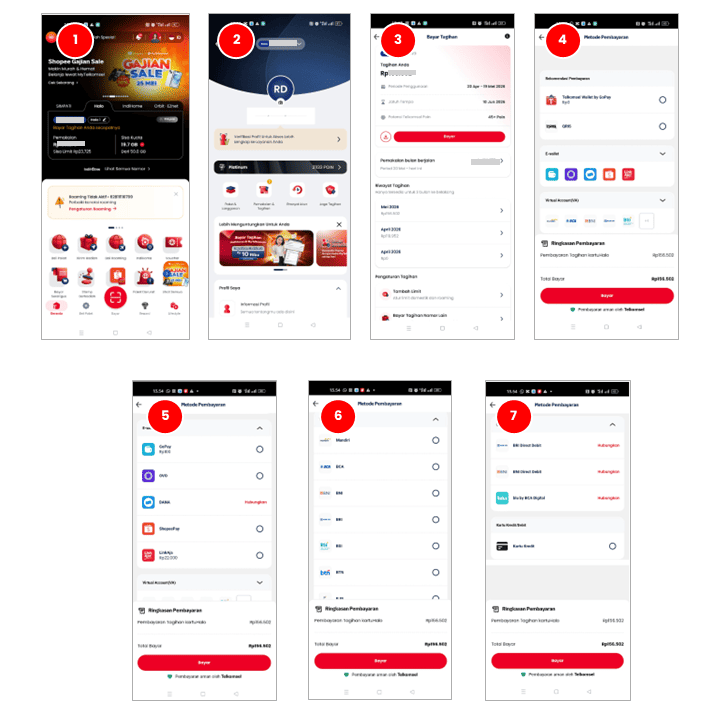
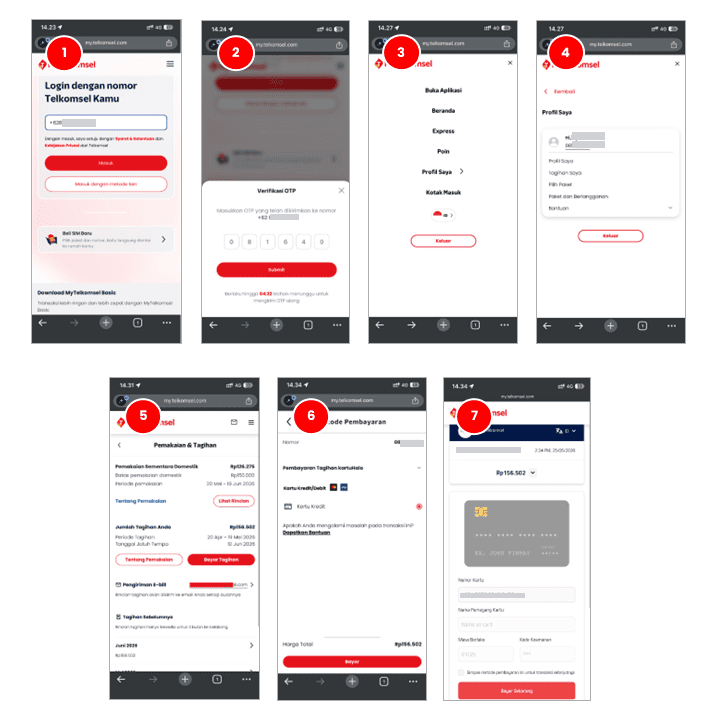
Enter your Telkomsel Halo number and the OTP code sent via SMS.
Go to "My Profile."
Select the "My Bills" menu.
Your bill amount will appear, along with the billing period and payment due date. Click "Pay Bill."
Select your payment method (Debit/Credit).
Then click "Pay."
Enter your Debit/Credit Card information.
Then click "Pay Now."
Your payment is successful.
Veronika
Veronika
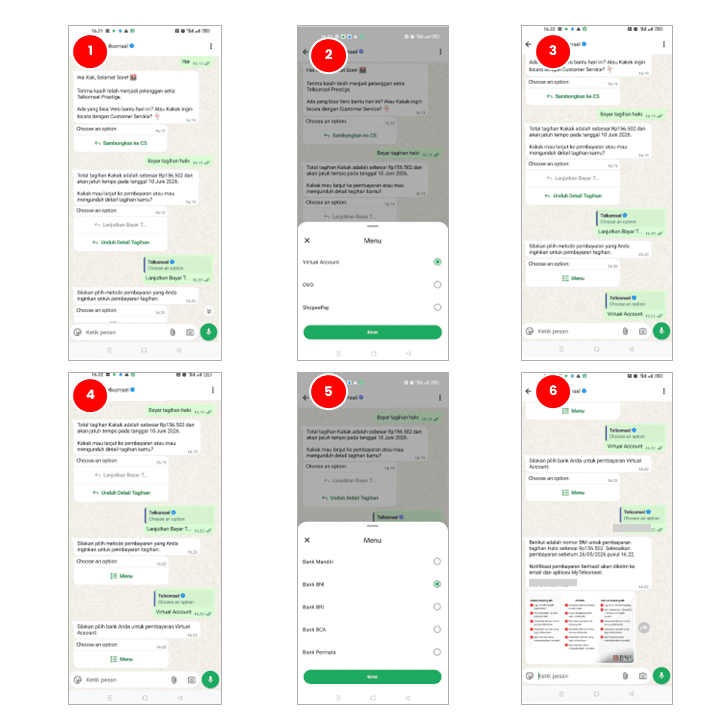
Visit the Veronika Virtual Assistant via Chat, WhatsApp, the MyTelkomsel App, the website, Facebook, or Telegram.
For example, use the Veronika Virtual Assistant via WhatsApp.
Type "Hi."
Type "Pay Bill Hello."
Select "Continue to Pay Bill."
Then, select a payment method.
Select the bank name to receive the virtual payment number.
Veronika will provide the bill amount and the virtual payment number for the selected bank.
The payment is successful.
LinkAja
LinkAja
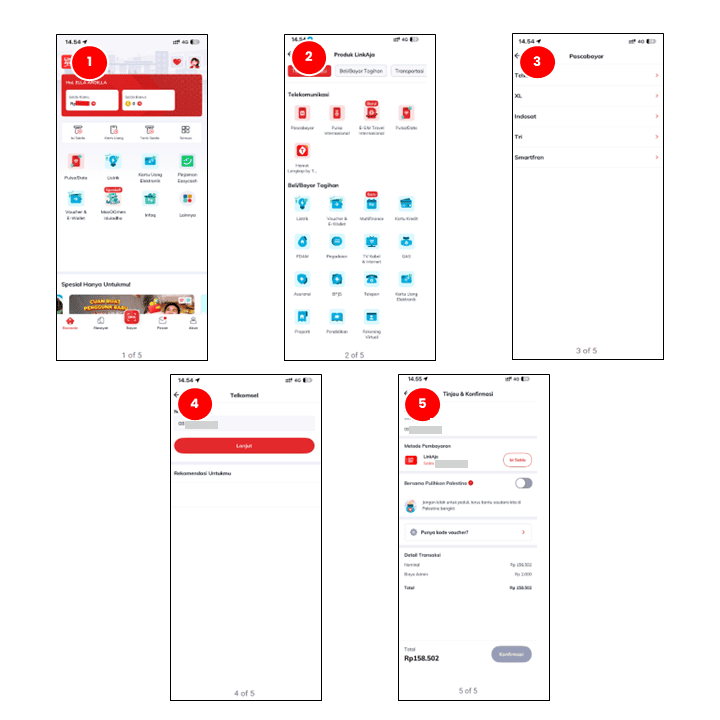
Open the LinkAja app.
Go to the "Other" menu.
Select "Postpaid."
Select "Telkomsel."
Then enter the phone number you want to pay for.
Review and confirm the phone number.
Tap "Confirm" to proceed with the payment.
Enter your LinkAja PIN.
The transaction is processed. Tap "Transaction Details" if necessary.
If the payment process is successful, tap "Finish."
The payment is successful.
Finpay
Finpay
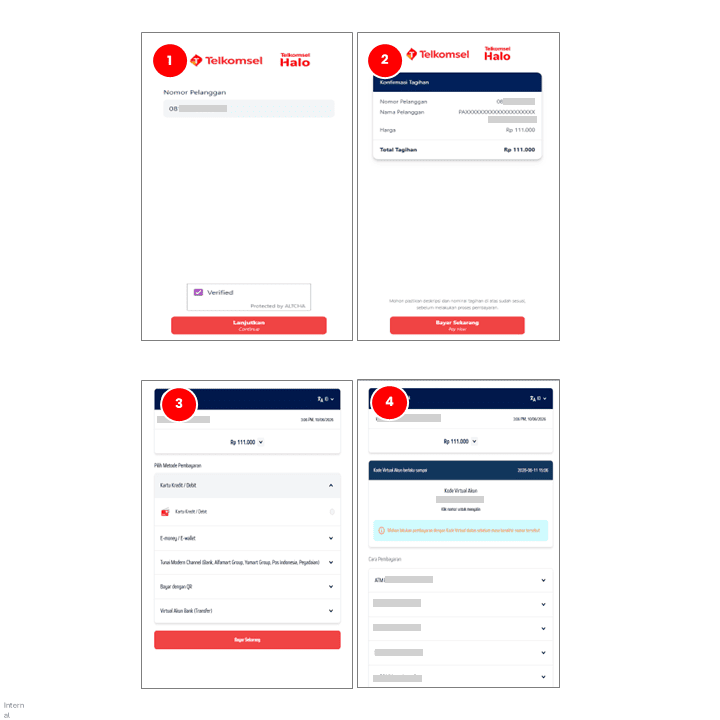
Access the Finpay payment link via the Finpay landing page using the button below.
Enter your Halo number and check the captcha, then tap "Continue."
Verify the bill amount that appears, then tap "Pay Now."
Select an available payment option.
Complete the payment process.
Payment is successful.
GoPay
GoPay
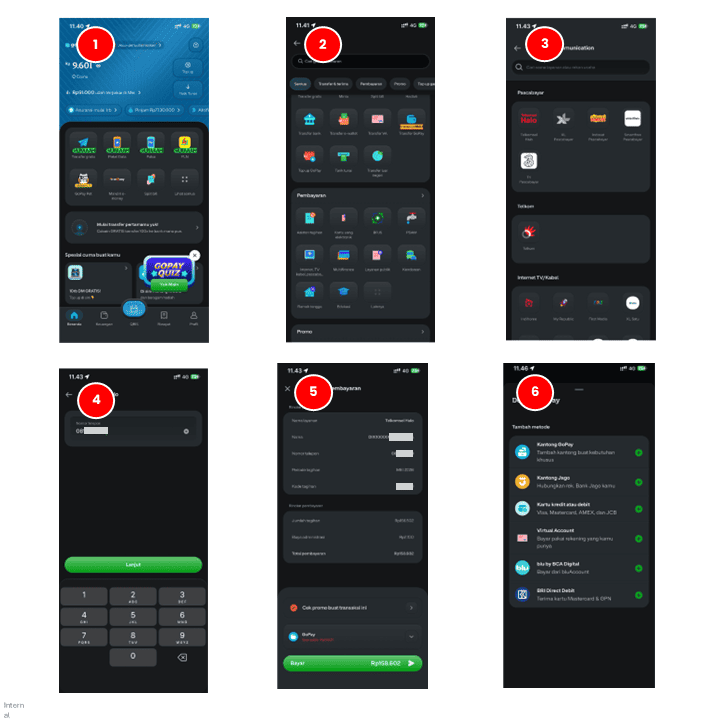
Open the "GoPay" app.
Tap the "View All" menu.
Select the “Payments” menu, then click "Internet, Cable TV, Postpaid."
Select "Telkomsel Halo" menu.
Enter your Telkomsel Halo number.
Tap "Continue."
Confirm payment.
Select an available payment method.
Tap the "Pay" button.
Payment is successful.
Shopee
Shopee
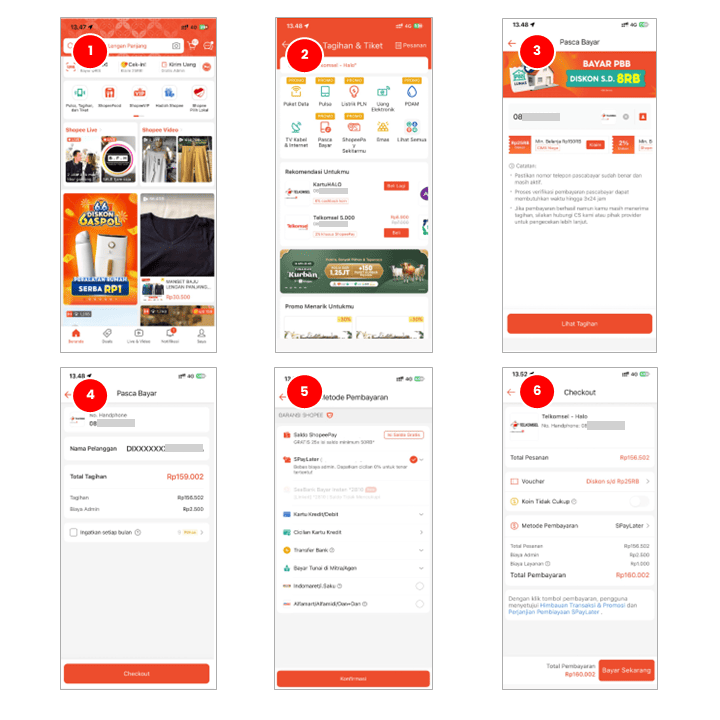
Open the "Shopee" app.
Select the "Credit, Bills, and Tickets" menu.
Select the "Postpaid" menu and enter your Telkomsel Halo number.
Tap "View Bill."
Tap "Checkout."
Choose a payment method. Available payment methods include ShopeePay, SPaylater, Credit/Debit Card, Credit Card Installments, Bank Transfer, Cash Payment with Partners/Agents, Indomaret/i.Saku, and Alfamart/Alfamidi/Dan+Dan.
Tap "Pay Now" and the system will immediately process the bill payment.
Payment is successful.
DANA
DANA
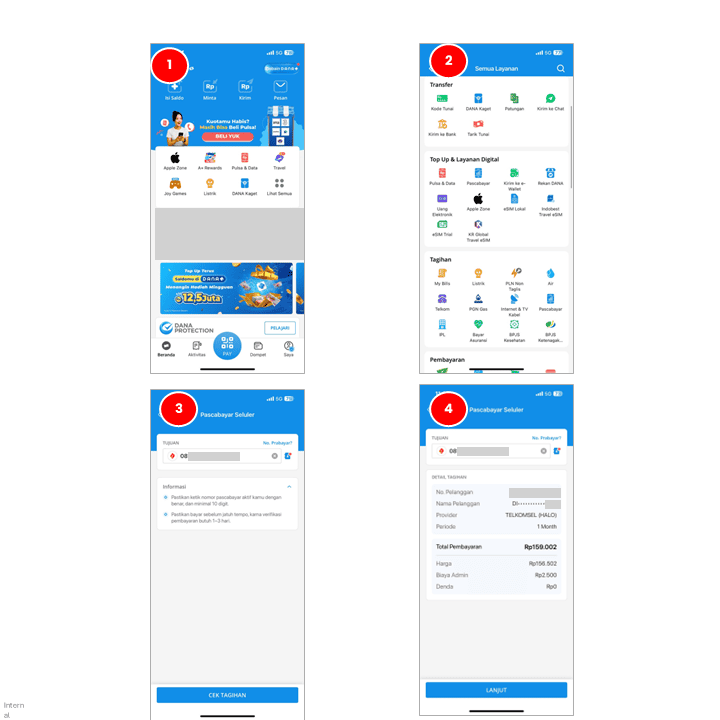
Open the "DANA" app.
Tap the "View All" menu.
Select the "Bills" menu.
Select the "Postpaid" menu.
Then enter your Telkomsel Halo number.
Tap "Check Bill."
The bill details and total payment will appear.
Tap "Continue."
Tap the "Pay" button.
The payment is successful.
Blibli
Blibli
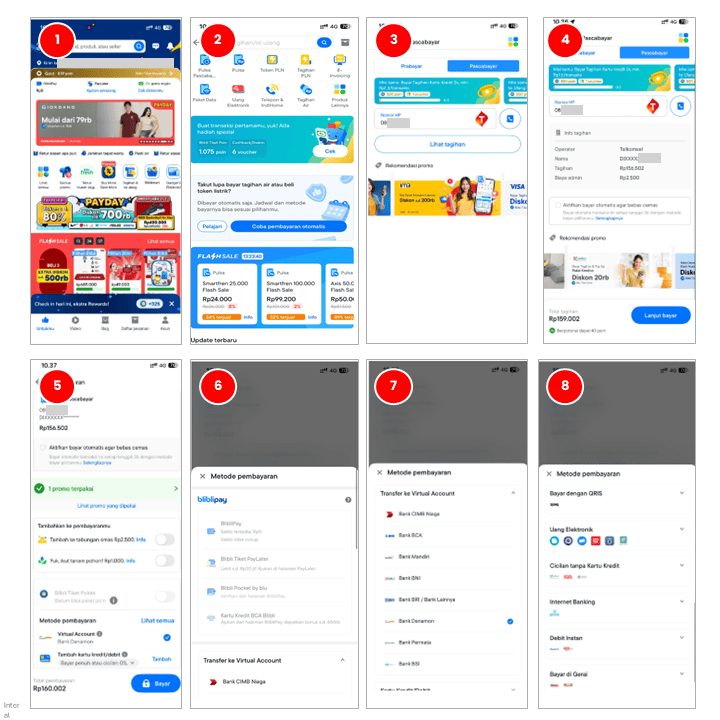
Open the Blibli app.
Select the "Bills & Top-Up" menu.
Select the "Postpaid Credit" menu.
Select the "Postpaid" tab and enter your Telkomsel Halo number.
Tap "View Bill".
Tap "Continue to Pay."
Select the payment method provided and click "Pay."
Payment is successful.
OVO
OVO
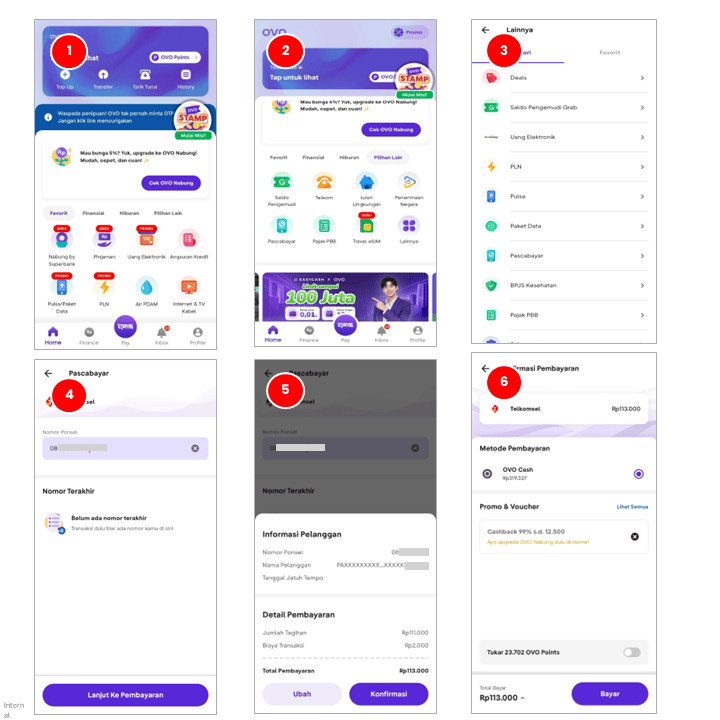
Open the OVO app.
Go to the "Other Options" menu > "Postpaid."
In the "Postpaid" category, select the "Postpaid" menu.
Enter the Halo number you wish to pay for.
Tap "Confirm" in the Customer Information section.
Enter the bill amount and click "Pay."
Enter your OVO PIN.
Payment is successful.
Tokopedia
Tokopedia
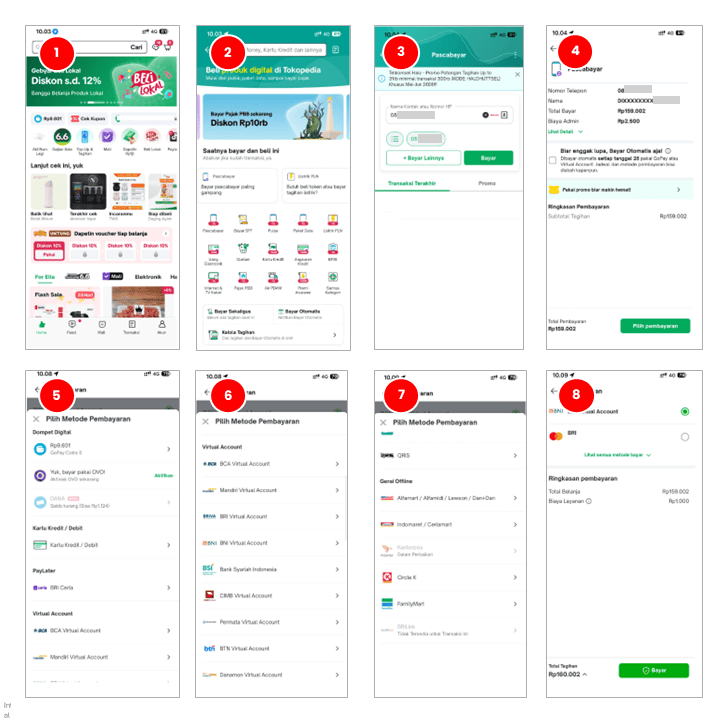
Open the "Tokopedia" app.
Select the "Top-Up & Bills" menu.
Select the "Postpaid" menu.
Enter your Telkomsel Halo number.
Then tap "Pay."
Tap "Select Payment" to proceed with payment. Available payment methods include digital wallets, credit/debit cards, Paylater, Virtual Accounts, Instant Debit, Instant Payments, and Offline Outlets.
Tap "Pay," and the system will immediately process the bill payment.
Payment is successful.
Livin’ by Mandiri
Livin’ by Mandiri
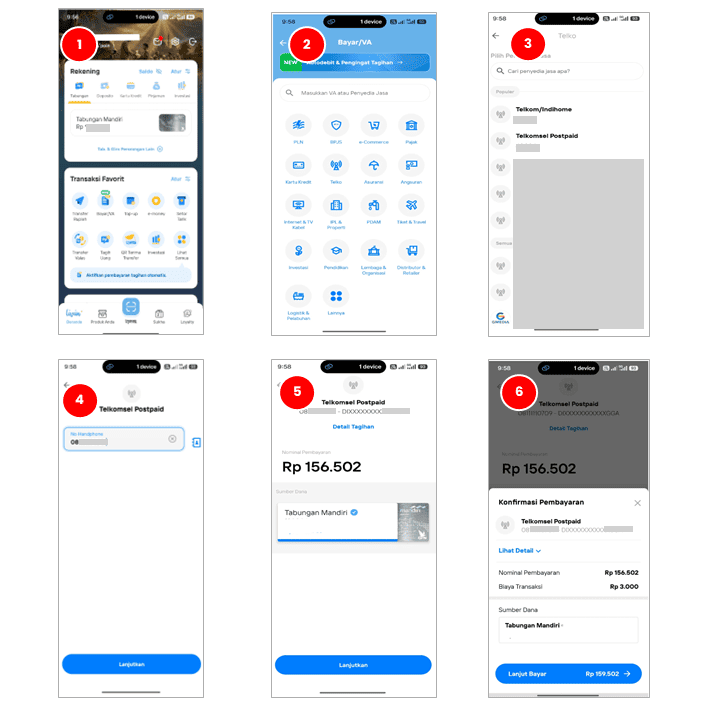
Open the Livin Mandiri app.
Go to the "Pay/VA" menu.
Select the "Telco" menu.
Select the "Telkomsel Postpaid" service provider.
Enter your Telkomsel Halo number and click "Continue."
Confirm payment.
Enter your PIN and click "OK."
Payment is successful.
Wondr by BNI
Wondr by BNI
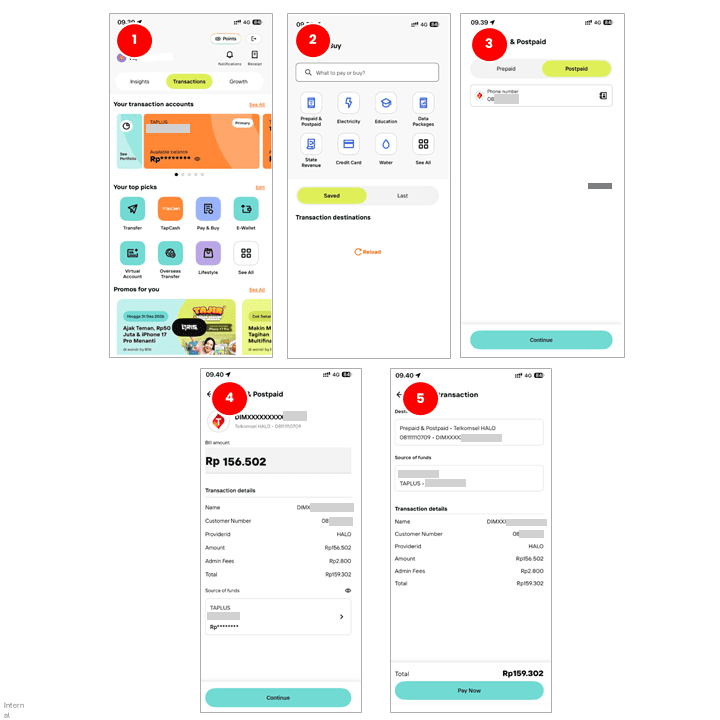
Open the Wondr by BNI app.
Select the "Purchase & Payment" menu.
Select "Prepaid & Postpaid."
Select the "Postpaid" tab and enter your Telkomsel Halo number.
Click "Continue."
Confirm payment.
Enter your PIN and click "OK."
Payment is successful.
BRImo BRI
BRImo BRI
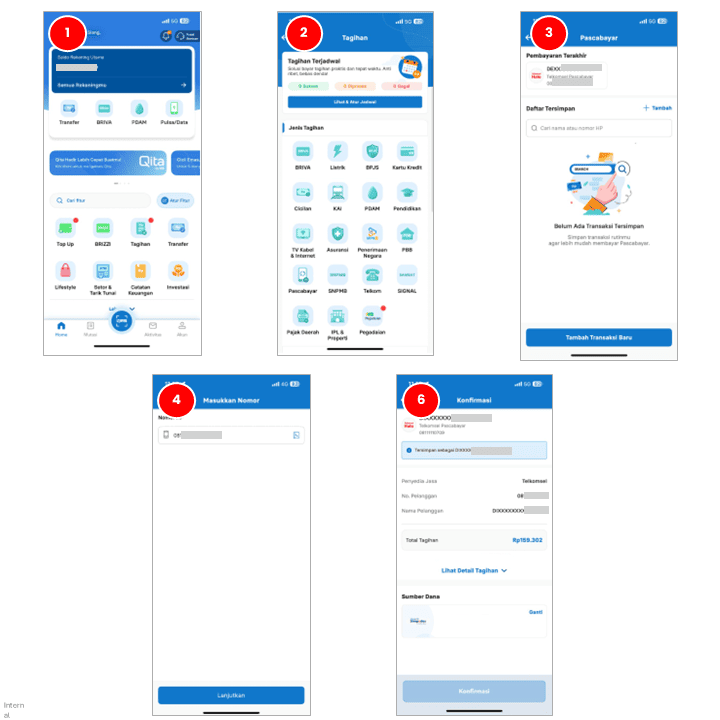
Open the BRImo Mobile Banking app.
Select the "Bills" menu.
Select the "Postpaid" menu.
Then add a transaction by entering your "Telkomsel Halo" number.
Tap "Continue."
Confirm payment.
Enter your PIN and make the payment.
Payment is successful.
BCA Mobile
BCA Mobile
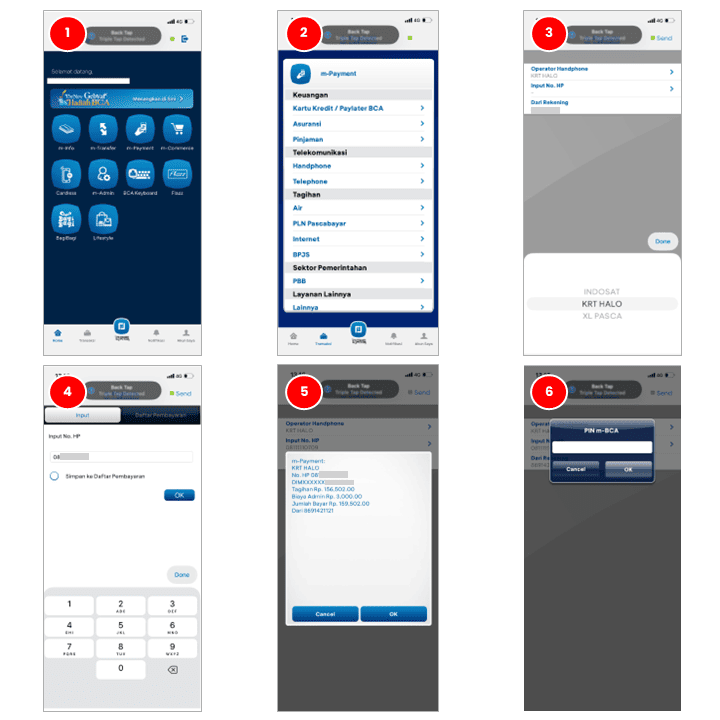
Open the BCA Mobile app.
Select the "m-Payment" menu.
Select the "Telecommunications" menu.
Then select "Mobile Phone".
Select "Mobile Operator - KRT HALO".
Enter your Telkomsel Halo number and tap "OK."
Confirm the payment and tap "Send."
Enter your PIN and tap "OK.”
The payment was successful.
myBCA
myBCA
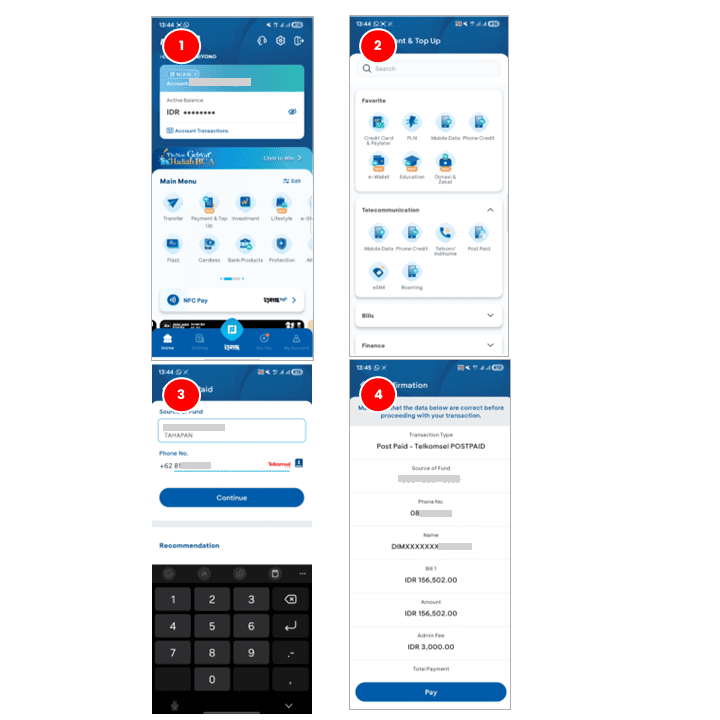
Open the myBCA app.
Select the "Payment & Top Up" menu.
Tap the "Postpaid" menu.
Enter your Telkomsel Halo number and tap "Continue."