


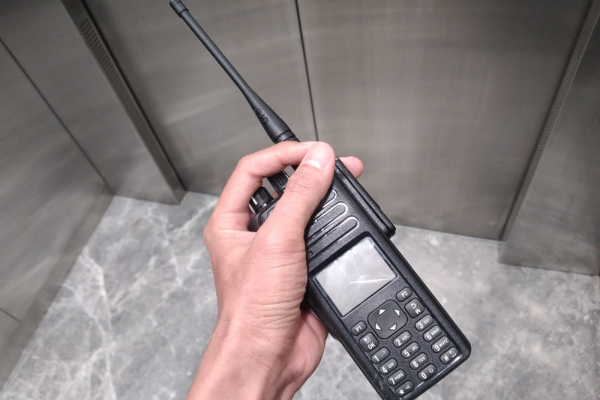


Smartphones are everywhere today, yet when split-second responses matter and a few seconds can change the entire outcome of a situation, a walkie-talkie remains completely unmatched.
That is exactly why this device continues to be a staple communication tool across various operational sectors. The real question now is, how to use a walkie-talkie properly to maximize its potential?
Walkie-talkie Function in Operational Communication
Unlike standard mobile phones, a walkie-talkie allows messages to be delivered instantly to all team members tuned to the exact same frequency. During operational activities, this device serves several critical functions:
1. Accelerating Team Coordination
When using a two-way radio, you never have to search through contact lists or wait for someone to answer a call. Messages can be broadcasted immediately just by pressing the Push-to-Talk (PTT) button.
2. Supporting Communication Across Wide Areas
The actual range of a walkie-talkie is quite impressive. This is why the device is heavily utilized across construction sites, warehouses, mining operations, shopping malls, and large-scale events that demand real-time communication.
3. Simplifying Field Supervision
Supervisors can deliver rapid instructions without delay. You can also receive reports from multiple locations instantly without ever having to leave your post.
4. Maintaining Operational Smoothness
When obstacles or emergency situations arise, critical information can be relayed to the entire relevant team immediately. This allows management to take swift and decisive action.
How to Use HT Correctly for Beginners
The core mechanism of a two-way radio is quite straightforward. However, if this is your very first time handling the device, here are the fundamental basics you need to master:
1. Ensure the Device is Ready for Action
Always check the battery level, antenna connection, and overall device condition before heading out. Conduct a quick communication test to ensure everything is functioning normally.
2. Match the Frequency or Channel
You can only communicate with individuals who are tuned to the exact same frequency. Therefore, verify that all team members are set to the identical channel or frequency before starting operations.
3. Press the Push-to-Talk (PTT) Button Correctly
When you want to speak, press and hold the PTT button for about one second before you actually start talking. This prevents the first word of your sentence from being cut off.
4. Deliver Messages Briefly and Clearly
Use sentences that get straight to the point. Avoid overly long explanations because the communication channel is shared and used on a rotational basis.
5. Release the PTT Button After Speaking
This step is frequently forgotten by beginners. If you keep the button pressed, other team members will be unable to respond or transmit their own messages.
6. Utilize Agreed-Upon Transition Words
Standard terms like "Roger", "Over", or "Stand By" help structure the conversation and make it much easier for everyone to understand the flow of information.
Rules and Ethics of Communication Using Walkie-talkie
Communicating using a walkie-talkie isn't just about technical aspects. There are etiquette requirements to ensure effective communication. Here are some basic rules to follow:
1. State Your Identity First
Always begin by identifying yourself and the recipient. For example, "Main Post calling the East Security Team."
2. Never Interrupt an Ongoing Conversation
Always ensure the channel is completely clear and silent before you press the PTT button to speak.
3. Maintain Polite and Professional Language
Avoid using harsh words or sharing information that is completely irrelevant to the work at hand.
4. Speak at a Normal Pace
Talking too fast makes the message difficult to comprehend over the radio. Conversely, speaking too slowly can bottleneck the communication flow. Stick to a steady, normal tempo.
5. Focus Strictly on Vital Information
A walkie-talkie is not a medium for casual, lengthy chats. The more concise your message, the more effective your communication will be.
Advantages and Disadvantages of Walkie-talkies for Business Needs
Before fully committing walkie-talkies for your business operations, it is crucial to understand both their strengths and their limitations.
The Advantages:
-
Communication is incredibly fast and instantaneous.
-
There is no need for credit pulses or mobile data packages.
-
The battery life is relatively long-lasting.
-
The device is user-friendly for people from all backgrounds.
-
Perfect for coordinating field teams in real-time.
The Limitations:
-
The communication range is physically restricted.
-
Conversations can only happen at one time (half-duplex).
-
Audio quality is easily disrupted by environmental conditions.
-
It is difficult to send data files like photos or videos.
-
Requires precise frequency configuration to avoid interference.
Common Walkie-talkie Challenges in Modern Operations
A walkie-talkie works well within its coverage area but becomes less effective when teams operate across large sites or different cities. As the distance increases, maintaining reliable communication becomes more difficult.
1. Limited Communication Range
A walkie-talkie works well within its coverage area but becomes less effective when teams operate across large sites or different cities. As the distance increases, maintaining reliable communication becomes more difficult.
2. Limited Communication Features
Traditional walkie-talkies mainly support voice communication. However, modern operations often require teams to quickly share photos, documents, and videos, which conventional walkie-talkies cannot provide.
3. Signal Interference
Walkie-talkie performance depends on radio signal quality. Obstacles such as tall buildings, hills, and other physical barriers can weaken the signal and reduce communication clarity.
The Evolution of Communication Technology: From Two-Way Radios to Push-to-Talk over Cellular (PoC)
Advances in communication technology have introduced Push-to-Talk over Cellular (PoC), combining the simplicity of a walkie-talkie with the wide coverage of cellular networks. One example is Touch to Talk from Telkomsel Enterprise.
This PoC-based communication solution combines the ease of using a walkie-talkie with the broad coverage of Telkomsel's cellular network. In addition to real-time voice communication, Touch to Talk also supports text messaging, image sharing, and video transmission, all through a single device.
These advanced capabilities make it easier for field teams to coordinate their work, respond more quickly to operational situations, and communicate more efficiently than with conventional walkie-talkies. For organizations seeking wider coverage and richer communication features, PoC technology offers a modern alternative that goes beyond the limitations of traditional radio systems.
FAQ
What is the average maximum range of a conventional walkie-talkie?
The range of a conventional walkie-talkie varies depending on the specific device, environmental conditions, and physical obstacles in the area. Under ideal conditions, the device can typically reach a few kilometers. However, in areas with heavy obstructions like tall buildings, hills, or when communicating across distant cities, communication quality will naturally drop.
Are there special permits or legalities required to use walkie-talkie radio frequencies?
Using radio frequencies on a walkie-talkie must strictly follow existing rules and regulations. Certain specific frequencies require official permits from authorized bodies to ensure they do not interfere with other frequencies reserved for public or critical operational needs.
What is the fundamental difference between analog walkie-talkies and digital SIM-based PoC technology?
The main difference lies in network infrastructure. Analog walkie-talkies rely on radio frequencies, meaning their range is limited to a specific physical area, and they only support voice communication. Meanwhile, Push-to-Talk over Cellular (PoC) technology utilizes cellular networks, offering a vastly wider coverage area. Beyond real-time voice, PoC devices also support the transmission of text messages, images, and videos.