




In today’s digital era, account security is more than just a technical issue. It's a critical business priority. Neglecting digital account protection can lead to data breaches, financial loss, operational disruption, and a serious blow to customer trust. One of the most dangerous and rapidly growing cyber threats today is account takeover (ATO).
What exactly is an account takeover? Why is it so harmful to businesses? And how can you protect yourself and your organization from this growing threat? Let’s dive into everything you need to know about account takeover prevention.
What Is Account Takeover?
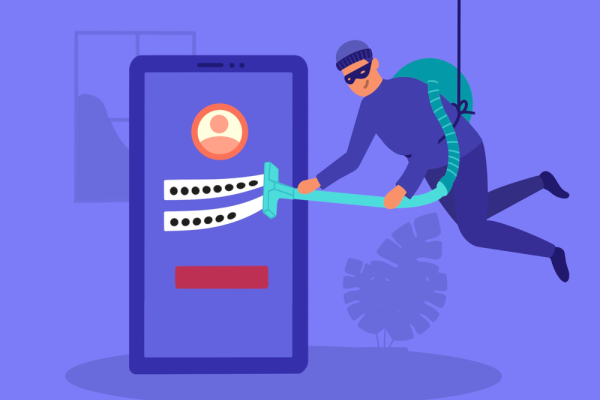
Account takeover is a type of cyberattack where a hacker gains unauthorized access to an account. This is often achieved by stealing login credentials through phishing, malware, brute-force attacks, or data breaches. Once inside, attackers may steal personal information, perform unauthorized transactions, or launch further attacks using the compromised account.
Account takeover attacks typically target accounts with financial value or access to sensitive data, including banking accounts, e-commerce platforms, social media profiles, and other digital services. According to the Financial Services Authority (OJK) in Indonesia, the top 10 banks in the country reported customer losses totaling Rp2.5 trillion between 2022 and 2024.
These losses were primarily due to customers unknowingly sharing OTP codes with scammers, allowing their bank accounts to be compromised. In Singapore, cases of ATO fraud doubled within just one year. Behind these staggering numbers are real people who lost their savings and livelihoods overnight. Clearly, account takeover has evolved into a global issue that demands immediate attention.
What Causes Account Takeover?
Understanding how account takeovers happen is the first step in stopping them. Here are the most common causes.
1. Data Breaches
Sensitive information like usernames and passwords can leak due to system hacks or mishandling of data. These stolen credentials often end up for sale on the dark web.
2. Phishing Scams
Phishing involves tricking users into revealing their login credentials by posing as a trusted entity, such as a bank or online service provider. Phishing attempts are commonly executed via email, text messages, or fake websites designed to look legitimate.
3. Malicious Apps
Some illegal apps or software are specifically designed to steal user credentials. These apps may masquerade as free tools or modified versions of popular applications but contain malware that logs keystrokes, capturing login details and passwords.
4. Document Theft
Cybercriminals can also take over accounts by stealing personal documents like IDs, credit cards, or bank statements. With this information, they can either access accounts directly or use it to reset passwords and regain control.
5. Weak Account Recovery Methods
If attackers gain access to your email or phone number, they can exploit insecure recovery systems to reset your passwords and take over your accounts.
6. Spyware
Spyware is malicious software installed on a victim’s device to monitor their activity. It can log every keystroke, including login credentials and other sensitive data, which is then sent to the attacker.
7. Spoofing
Spoofing involves impersonating legitimate websites, phone numbers, or organizations to deceive users into disclosing login information.
Signs of an Account Takeover Attack
Recognizing the signs of an account takeover early can help mitigate damage. Here are some red flags to watch out for:
Unexpected Account Changes
One of the clearest indicators of an account takeover is unauthorized changes to critical details, such as email addresses, phone numbers, or passwords. Suspicious activities like unfamiliar transactions, unauthorized messages, or altered security settings are also warning signs.
Suspicious Login Alerts
If you receive alerts about login attempts from unfamiliar locations or devices, it could mean someone has gained unauthorized access to your account. Many digital platforms have features that notify users of new device logins via email or app notifications. If you don’t recognize the activity, act quickly to secure your account.
Reset Password Notifications
Hackers often attempt to reset passwords to lock out the original owner. Receiving unsolicited password reset emails or notifications without initiating the request is a strong indication that someone is trying to take over your account.
Locked Out of Your Account
If you suddenly find yourself unable to log in despite entering the correct password, it’s likely that your account has been compromised. Cybercriminals typically change the password immediately after gaining access, leaving the rightful owner locked out.
The Business Impact of Account Takeover Attacks
ATO attacks don’t just affect individuals, they can cripple businesses. Here’s a breakdown of the potential risks:
1. Financial Loss
ATO attacks can result in unauthorized transactions, stolen funds, or misuse of corporate financial resources. Additionally, businesses may incur costs related to restoring account security and compensating affected customers.
2. Data Theft and Misuse
Hackers who gain control of business accounts can access sensitive data, including customer information, internal documents, and transaction records. This stolen data can be used for further cybercrimes like fraud or extortion.
3. Brand Damage
If a company’s official account is hijacked, attackers can impersonate the brand to deceive customers, conduct fake transactions, or spread misleading information. Such incidents can severely damage a brand’s reputation and erode customer confidence.
4. Phishing and Malware Spread
Compromised accounts can serve as launchpads for phishing campaigns or malware distribution targeting customers, business partners, and even employees. These secondary attacks amplify the negative impact and increase security risks across multiple fronts.
5. Operational Disruption
When key accounts such as corporate email or business management systems are compromised, day-to-day operations can grind to a halt. The resulting drop in productivity, delayed customer service, and inefficient business processes can have long-lasting effects.
6. Loss of Customer Trust
When clients learn that their data might be at risk, they may hesitate to continue working with you, affecting both sales and long-term loyalty.
7. Legal and Regulatory Penalties
Many countries enforce strict regulations regarding user data protection, such as GDPR in Europe and Indonesia’s Personal Data Protection Law. Failure to safeguard accounts and user data can result in hefty fines, legal sanctions, or lawsuits from affected customers.
5 Key Strategies for Account Takeover Prevention
To protect your business, here are five effective strategies for account takeover prevention:
1. Employee Cybersecurity Training
One of the best defenses against account takeover is educating employees about cybersecurity threats, including phishing, malware, and hacking techniques. Well-informed employees are better equipped to identify suspicious emails, harmful links, or unauthorized requests for login information.
2. Limit Account Access
Not all employees need access to every system or piece of data within an organization. Implementing role-based access control ensures that each employee only has access to the information and features necessary for their job. This minimizes the risk of abuse if an account is compromised.
3. Strong Password Policies
Many account takeover incidents occur because of weak or reused passwords. To prevent this, enforce robust password policies, including:
-
Minimum 12 characters with a mix of uppercase, lowercase, numbers, and symbols
-
Prohibition of common or easily guessed passwords
-
Regular mandatory password updates
-
Prevention of reusing old passwords
4. Enable Multi-Factor Authentication (MFA)
MFA adds an extra layer of security by requiring users to verify their identity through a second method, such as OTP codes, biometric authentication, or authenticator apps. Even if a hacker steals a password, they won’t be able to access the account without the additional verification step.
5. Monitor Unusual Login Activity
Businesses can enhance security by monitoring IP addresses accessing their systems. If there are login attempts from unusual locations or devices, the system can automatically block access or request additional verification. This helps prevent unauthorized access from hackers operating outside the usual network.
Protecting your business from account takeovers is not optional, but it's essential. That’s why Telkomsel Enterprise offers Telco Verify, a seamless solution that verifies users through their phone number and no OTP needed.
With Telco Verify, businesses can enjoy enhanced security, minimize unauthorized access, and protect accounts from sophisticated cyber threats. Partnering with Telkomsel Enterprise ensures not only the safety of your business accounts but also the seamless continuity of secure operations.
For more information on how Telco Verify can elevate your business’s cybersecurity, contact us today!